
📊 Full opportunity report: Undervolting Your GPU for Local Inference: Lower Heat, Same Tokens/sec on ThorstenMeyerAI.com — validation score, market gap, and execution plan.
TL;DR
Undervolting your GPU for local AI inference can significantly lower heat output and noise without sacrificing tokens/sec performance. Power limiting is the easiest method, confirmed by recent data, making it ideal for inference workloads.
Recent tests confirm that undervolting and power limiting GPUs during local AI inference can substantially reduce heat output and noise while maintaining near-original tokens-per-second performance.
Recent data from developers and hardware tests show that lowering the power limit of high-end GPUs like the RTX 4090 and RTX 5090 results in significant heat and noise reductions—up to 45% less power consumption—without meaningful loss in inference speed. The primary method, known as power limiting, involves adjusting a slider in GPU management software such as MSI Afterburner, which reduces voltage and clock speeds to stay within a set power threshold. This approach is reversible, safe, and requires no stability testing.
Undervolting, which involves directly editing the GPU’s voltage-frequency curve, can further optimize performance per watt but is more complex and recommended only for advanced users. Tests indicate that capping power at around 60-80% of maximum yields the best balance, with performance drops of only 2-10%, while temperatures and noise levels decrease significantly. For example, at 70% power limit, a GPU can operate at roughly 93% of its original speed with 90 watts less heat, making it ideal for continuous inference workloads.
Undervolt for inference:
lower heat, same tokens/sec.
Local inference is memory-bound — the GPU core spends much of its time waiting on VRAM, not maxing out compute. So when you cap its power, heat falls fast while throughput barely moves. Drag the slider in Part 2 to see the trade for yourself.
(the real limit)
(often waiting)
you pay for in heat
| Power limit | Power draw | Temp | Speed kept | Efficiency |
|---|---|---|---|---|
| 100% (stock) | 390 W | 72°C | 100% | baseline |
| 80% | 330 W | 70°C | 98.6% | +17% |
| 70%recommended | 300 W | 67°C | 93.4% | +22% |
| 60% | 260 W | 62°C | 91.5% | +37% |
| 55%peak efficiency | 240 W | 60°C | 89.2% | +45% |
| 50% | 220 W | 58°C | 82.6% | +46% |
| 40% (too far) | 180 W | 52°C | 61.3% | falls off |
- One slider, 100% → 70%. The card reduces voltage and clocks on its own.
- Can’t damage anything — you’re restricting the card, not pushing it.
- No stability testing needed.
- Captures most of the available benefit.
- Edit the voltage-frequency curve — hold a clock at lower voltage.
- Target around 0.9–0.95V to start; better chips go lower.
- Keeps more performance for the same heat cut.
- Test under your real workload — a curve stable for 10 min can fail on hour 3.
MSI Afterburner (works on any brand). Headless Linux: nvidia-smi or LACT.sudo nvidia-smi -pl 300.Impact of Undervolting on AI Inference Workstations
Undervolting and power limiting are practical strategies for AI inference setups, especially in environments where heat, noise, and energy efficiency are concerns. By reducing heat output, users can extend hardware lifespan, improve workspace comfort, and decrease cooling costs. The minimal performance loss means inference tasks remain efficient, making this approach highly attractive for data centers, research labs, and individual AI practitioners. This development empowers users to optimize their GPU workloads without hardware modifications or risking stability.

msi Gaming GeForce RTX 3090 24GB GDRR6X 384-Bit HDMI/DP Nvlink Tri-Frozr 2 Ampere Architecture OC Graphics Card (RTX 3090 Gaming X Trio 24G)
- Memory Speed: 19.5 Gbps
- Max Resolution: 7680x4320
- Chipset: NVIDIA GeForce RTX 3090
As an affiliate, we earn on qualifying purchases.
As an affiliate, we earn on qualifying purchases.
GPU Factory Settings and Inference-Specific Bottlenecks
Modern GPUs, including NVIDIA's RTX series, are factory-tuned for gaming and high benchmark scores, often with conservative voltage curves to ensure stability. These settings result in excess heat and power draw, especially during inference tasks that are memory-bandwidth-bound rather than compute-bound. In local large language model (LLM) inference, the GPU spends much of its time waiting for data transfer rather than performing calculations, meaning the core clock speed isn't always the limiting factor. This mismatch allows for aggressive undervolting and power limiting without compromising throughput.
Previous guides focused on gaming performance, where reducing core speed can cause noticeable frame drops. However, inference workloads are different, and recent testing confirms that lowering power limits yields substantial heat and noise reductions with negligible speed impacts.
"Most local LLM work is memory-bandwidth-bound, so the GPU doesn’t need to run at peak clock to keep up. Backing off the core slightly barely moves tokens/sec but reduces heat significantly."
— Thorsten Meyer

Graphics Cards GPU Brace Support Magnetic Adjustable Height 49mm-80mm Black
- Material: Aluminum-magnesium alloy for durability
- Height Adjustment: Supports 49-80mm height with telescopic screw
- Easy Installation: Tool-less setup in under a minute
As an affiliate, we earn on qualifying purchases.
As an affiliate, we earn on qualifying purchases.
Remaining Questions on Long-term Stability and Compatibility
While initial tests show promising results, long-term stability of undervolted or power-limited GPUs during continuous inference workloads remains to be fully validated. Compatibility issues with certain GPU models or BIOS configurations are also still being explored, and user experiences may vary based on hardware specifics.

Tall GPU Support Bracket - Heavy Duty Adjustable GPU Anti Sag Holder & Support Stand for Graphics Card, 4.53"-8.27" Height Durable Black Metal PC Build Stabilizer, Large/Long GPU Sag Prevention
- Graphics Card Support: Supports heavy and large GPUs
- Material: Made of durable aluminum metal
- Magnet Design: Hidden magnet for easy, stable installation
As an affiliate, we earn on qualifying purchases.
As an affiliate, we earn on qualifying purchases.
Next Steps for GPU Optimization in AI Inference
Further testing across different GPU models and workloads will help refine optimal power and voltage settings. Developers and users are encouraged to experiment with power limiting as a first step, and to monitor stability and performance. Software updates from GPU manufacturers may also introduce more granular control options, making fine-tuning easier and safer.
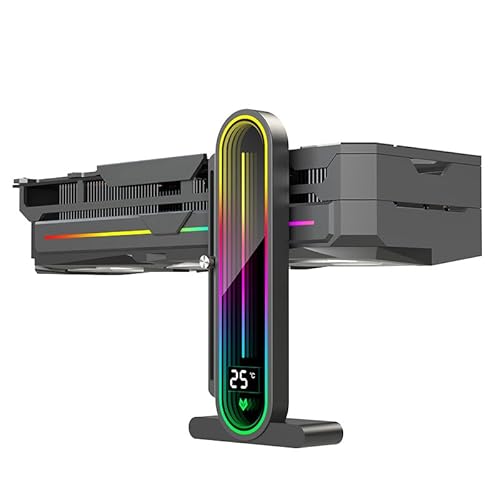
Temperature Displaying GPU Stand ARGB Infinity Graphics Card Support Adjustable 5V 3PIN Video Card Holder Anti-sag Bracket Magnetic Base Display Card Brace Rack PC Graphic Card Accessories (Black)
- Temperature Monitoring: Real-time chassis temperature display
- Large Screen Lens: Infinite lens for enhanced visuals
- Adjustable Support Frame: Slide and fix for custom height
As an affiliate, we earn on qualifying purchases.
As an affiliate, we earn on qualifying purchases.
Key Questions
Can undervolting damage my GPU?
No. Undervolting and power limiting are reversible and do not physically damage the hardware. They simply restrict power and voltage to safe levels set by the user.
Will I notice a performance drop in inference tasks?
In most cases, performance loss is minimal—around 2-10%—especially when using power limiting at 60-80%. The actual impact depends on workload specifics and GPU model.
Is undervolting suitable for gaming or only inference?
While undervolting can benefit gaming by reducing heat and noise, it is particularly advantageous for inference workloads where core speed is less critical than memory bandwidth.
How do I start undervolting or power limiting my GPU?
Begin with power limiting using tools like MSI Afterburner to set a lower power cap. For undervolting, advanced users can edit voltage-frequency curves, but this requires stability testing and caution.
Source: ThorstenMeyerAI.com